GTxA Lab
From words, to codes, to theory.
語から、コードへ、そして理論へ。
A desktop application for text mining, grounded theory coding with AI support, and mixed methods analysis — free and open source, developed by extending KH Coder.
テキストマイニング、AI支援によるグラウンデッド・セオリーのコーディング、混合研究法の分析を一つにまとめた、無料のオープンソース・デスクトップアプリです。KH Coder を拡張して開発されました。
Current version: · What's new
現在の版: · 新しくなったこと
Promotional video (about 2 min 7 s, English narration with English captions). The screens are from version 1.0.38; the screen layouts are unchanged in 1.0.43. It covers the main flow — coding, cross tabulation and joint display; newer additions such as the AI meta-inference buttons are described on this site.
紹介ビデオ(約2分7秒。英語ナレーション・英語字幕つき)。画面は版 1.0.38 のものです(画面の構成は 1.0.43 でも変わっていません)。コーディング・クロス集計・ジョイントディスプレイという主な流れを紹介しています。AIによるメタ推論のボタンなど新しい機能は、このサイトの説明をご覧ください。
What's new (1.0.43)新しくなったこと(1.0.43)
Changes since version 1.0.19, grouped by topic. Details of every version are in README.md in the source Zip (in Japanese).
版 1.0.19 からの主な変更を、テーマ別にまとめました。各版の詳細は、ソースの Zip の README.md にあります。
AI coding for mixed methods混合研究法のAIコーディング
MMR → Joint Display (AI coding) uses the LLM as a coder: it proposes themes from free text (Create AI theme book), classifies each row with a quotation that the software checks against the original text, and builds the joint display. The meta-inference can be written by the LLM, briefly or in detail. A second AI can code the same rows to compare (triangulation).
MMR → ジョイントディスプレイ(AIでコード化)は、LLM を「コーダー」として使います。自由記述からテーマを作り(AIテーマブックの作成)、1 行ずつ分類して、根拠の引用が原文にあるかをプログラムが照合し、ジョイントディスプレイを作ります。メタ推論は、LLM に簡略・詳細で書かせることもできます。2 つ目の AI にも同じ行を分類させて比べる(三角検証)こともできます。
Use the Claude, Gemini and ChatGPT appsClaude・Gemini・ChatGPT のアプリで使う
Manual copy: GTxA Lab makes the prompt, you paste it into the app you already use and paste the answer back — no API key needed. A record of the exchanges can be saved as an appendix. A browser pane can be shown beside the dialog. Prompts contain the respondents' text, so check the service's terms and privacy settings first.
手動コピー:GTxA Lab がプロンプトを作り、いつも使っているアプリに貼り付けて、答えを貼り戻します。API キーは不要です。やり取りの記録は、付録として保存できます。ダイアログの横にブラウザ画面を並べることもできます。プロンプトには回答者の文章が入るので、サービスの利用条件とプライバシーの設定を先に確かめてください。
Dictionaries辞書
Pre-processing → Dictionaries…: user dictionary, split dictionary (Japanese) and synonym dictionary, with Text Mining Studio-style CSV import/export and registration from result tables by right-click.
前処理 → 辞書…:ユーザ辞書・分割辞書(日本語)・類義語辞書。Text Mining Studio の形式の CSV の読み込み・書き出しと、結果の表からの右クリックでの登録ができます。
Mining analyses: richer chartsマイニング:図の強化
In Data Tabulation → Mining, Word Frequency and Dependency Frequency draw exactly the top N items asked for, with cross-tabulation bubble charts by attribute or by date. Time Series has stacked-area layers that highlight on hover and open the KWIC concordance on click. Cross-tabulation charts can be zoomed, and font size and marker shape can be changed.
データ集計 → マイニングの単語頻度解析・係り受け頻度解析は、指定した上位 N 件をすべて描き、属性別・日付別のバブルのクロス集計を備えます。時系列分析の積み上げ面は、層にマウスを乗せると強調され、クリックすると KWIC コンコーダンスが開きます。クロス集計の図は、拡大・縮小、文字の大きさ、マークの形を変えられます。
More local models, steadier small modelsローカルモデルの追加と、小さなモデルへの対策
Gemma 3 1B and Qwen3-0.6B were added (10 built-in models in all). For small models, line-by-line and focused coding now remove leftover headings, drop explanatory sentences and sentences not supported by the text, and fall back to a rule-based phrase when the model's answer is broken or unrelated to the text.
Gemma 3 1B と Qwen3-0.6B を加えました(内蔵は全部で 10 モデル)。小さなモデルの出力に対しては、行ごと・焦点化コーディングで、残った見出しの除去、説明だけの文や本文にない内容の文の除去を行い、答えが崩れている・本文と関係ないときは、規則で作る語句に切り替えます。
Start-up and builds起動と実行ファイル
Start from source with python -m gtxa (gtpy and khpy still work). The build scripts now bundle the browser pane used by manual copy by default, which makes the application larger (a Linux build was about 0.9 GB); set GTXA_WEBENGINE=0 to build without it.
ソースからは python -m gtxa で起動します(gtpy・khpy も使えます)。実行ファイルを作るスクリプトは、手動コピーで使うブラウザ画面を既定で同梱するようになり、そのぶん大きくなります(Linux 版で約 0.9GB)。GTXA_WEBENGINE=0 を指定すると、同梱しない版を作れます。
Latest versions (1.0.39 – 1.0.43): GPU download and small-model coding最近の版(1.0.39〜1.0.43):GPU のダウンロードと、小さなモデルのコーディング
- 1.0.39 — Use GPU download: the llama.cpp release marked “latest” may contain only source code, so GTxA Lab now walks back through the releases and takes the newest one that has a build for your computer (Vulkan, CUDA, HIP/ROCm, or CPU). Releases that ship a single
llamaprogram with aservesubcommand are also handled. - 1.0.40 — The downloaded archive is recognised by its contents, not its file name. This fixes the “file could not be opened successfully” error that appeared for a valid Zip saved under a temporary name.
- 1.0.41 — Focused coding with a small model run on the GPU now gets the same check as one run on the CPU. A suggested focused code must also share a larger part of its content characters (at least 40 %) with the narrative, so garbled strings such as “経験能性の構” are rejected.
- 1.0.43 — Two fixes in the joint display and the warnings. (1) When the codes of a group point both ways (positive and negative), the automatic tone estimate now follows the cue that comes later in the text, so a response such as “I lost some confidence, but I see it as a positive experience” is read as positive, and the draft meta-inference describes a gap instead of a confirmation. (2) Warning messages shown under the coding tables and in the dialogs are now translated, so they appear in English when the interface language is English.
- 1.0.42 — Leftover labels such as
焦点化コード:**are removed from AI suggestions and integrated proposals, and topic-only codes (for example “how to deal with children”) are rejected for small models; the integration step also checks that the code is grounded in the text.
- 1.0.39 — [GPU を使う]のダウンロード:llama.cpp の「latest」が、ソースコードだけのことがあるため、リリースを順にさかのぼって、お使いのパソコン用のビルド(Vulkan・CUDA・HIP/ROCm・CPU)のある最新のリリースを使うようにしました。1 つの
llamaプログラムにserveを付けて動かす形式のリリースにも対応しています。 - 1.0.40 — ダウンロードしたファイルが Zip かどうかを、ファイル名ではなく中身で判定します。正しい Zip なのに、仮の名前で保存されて「ファイルを開けませんでした」と出る問題を直しました。
- 1.0.41 — GPU で動かす小さなモデルにも、CPU のときと同じ確認をします。提案された焦点化コードは、本文と重なる内容の文字が一定の割合(40% 以上)なければ採用せず、「経験能性の構」のような意味の通らない文字列を除きます。
- 1.0.43 — ジョイントディスプレイと警告表示の不具合を 2 点直しました。(1) 1 つのグループのコードに、肯定と否定の両方の手がかりがあるとき、自動の調子の推定は、文中で後に出てくる手がかりに従います。「自信は失ったが、前向きな経験だと思う」のような回答が肯定と読まれ、メタ推論の下書きは「確認」ではなく「ずれ」を述べます。(2) コード表の下やダイアログに出る警告の文を翻訳するようにしました。画面の言語が英語のときは、英語で表示されます。
- 1.0.42 — AI 提案と統合案に残る「焦点化コード:**」のような見出しを取り除き、小さなモデルでは、「子どもへの関わり方」のような話題だけのコードを使わないようにしました。統合の段階でも、本文に根拠のあるコードかを確かめます。
These changes were tested with simulated downloads and model answers; a real GitHub download and each real model were not tested in the environment where this site was prepared. Please read the AI's suggestions critically.
これらの変更は、模擬のダウンロードと模擬のモデルの答えで確かめました。実際の GitHub からのダウンロードや、実際の各モデルでの動作は、このサイトを用意した環境では確かめていません。AI の提案は、批判的に読んでください。
Latest versions (1.0.34 – 1.0.38): small local models最近の版(1.0.34〜1.0.38):小さなローカルモデルへの対応
- 1.0.34 — Line-by-line coding no longer leaves headings like “Cognition:” or
**in the answer. Focused coding rejects answers such as “Category 1: …” and label-only or predicate-like phrases. Word-by-word terms are snapped to word boundaries, and the repeat penalty is switched off for the copy-style extraction. - 1.0.35 — The line-by-line prompt no longer invites “the writer felt …” sentences. Such explanatory sentences are removed, sentences whose content words do not appear in the text are replaced by an excerpt from the text, and a sentence never ends on a connective.
- 1.0.36 — Focused coding (Japanese): the viewpoint instruction (“thoughts, feelings, actions”) was removed from the prompt, which had led small models to import words the narrative does not contain. If an answer shares no kanji or katakana with the text, the model is asked again (up to twice, at a higher temperature); if it still does not match, a rule-based noun phrase is used.
- 1.0.37 / 1.0.38 — That check is limited to small local models: about 4B parameters or fewer, read from the GGUF header (
general.size_label), independent of quantization; if the header does not give it, a file size of about 3 GB or less. Larger local models, cloud APIs and the ChatGPT plan are not affected, so good paraphrases are not discarded and no extra requests are made.
- 1.0.34 — 行ごとコーディングで、「認知:」のような見出しや
**が答えに残らないようにしました。焦点化コーディングでは、「カテゴリ1:…」のような答えや、見出しだけ・述語の形の語句を使いません。語ごとコーディングの語は、語の区切りにそろえ、本文を書き写す抽出では、繰り返しを抑える設定を使いません。 - 1.0.35 — 行ごとコーディングのプロンプトが「書き手が…と感じた」という文を誘わないようにしました。そのような説明だけの文は除き、本文にない内容語の文は本文の抜粋に置き換え、文が接続の言葉で終わらないようにしました。
- 1.0.36 — 焦点化コーディング(日本語):プロンプトから「考え・気持ち・行い」の観点の指定を外しました(小さなモデルが、語りにない語を持ち出す原因になっていました)。答えの漢字・カタカナが本文と 1 字も重ならないときは、温度を上げて最大 2 回聞き直し、それでも合わなければ、規則で作る名詞句を使います。
- 1.0.37・1.0.38 — この確認を、小さなローカルモデルだけにしました。判定は、GGUF の見出し(
general.size_label)から読むパラメータ数が約 4B 以下かどうかで行い(量子化に左右されません)、見出しから分からないときは、ファイルの大きさが約 3GB 以下かどうかで行います。大きなローカルモデル、クラウドの API、ChatGPT のプランでは確認も聞き直しもしないので、言い換えた良い答えを落とさず、リクエストも増えません。
These safeguards were tested with simulated model answers. The behaviour of each real model was not verified, so always read the AI's suggestions critically.
これらの対策は、模擬の答えで確かめたものです。実際のモデルごとの動作までは確かめていないので、AI の提案は、かならず批判的に読んでください。
What you can doできること
Everything runs on your own computer (the AI features can also use a cloud service, if you choose), from the first word frequency list to a joint display of quantitative and qualitative findings.
最初の頻出語リストから、量的データと質的データを並べたジョイントディスプレイまで、ご自分のコンピュータの中で行えます(AI機能は、ご自分で選べば、クラウドのサービスも使えます)。
Text mining essentialsテキストマイニングの基本
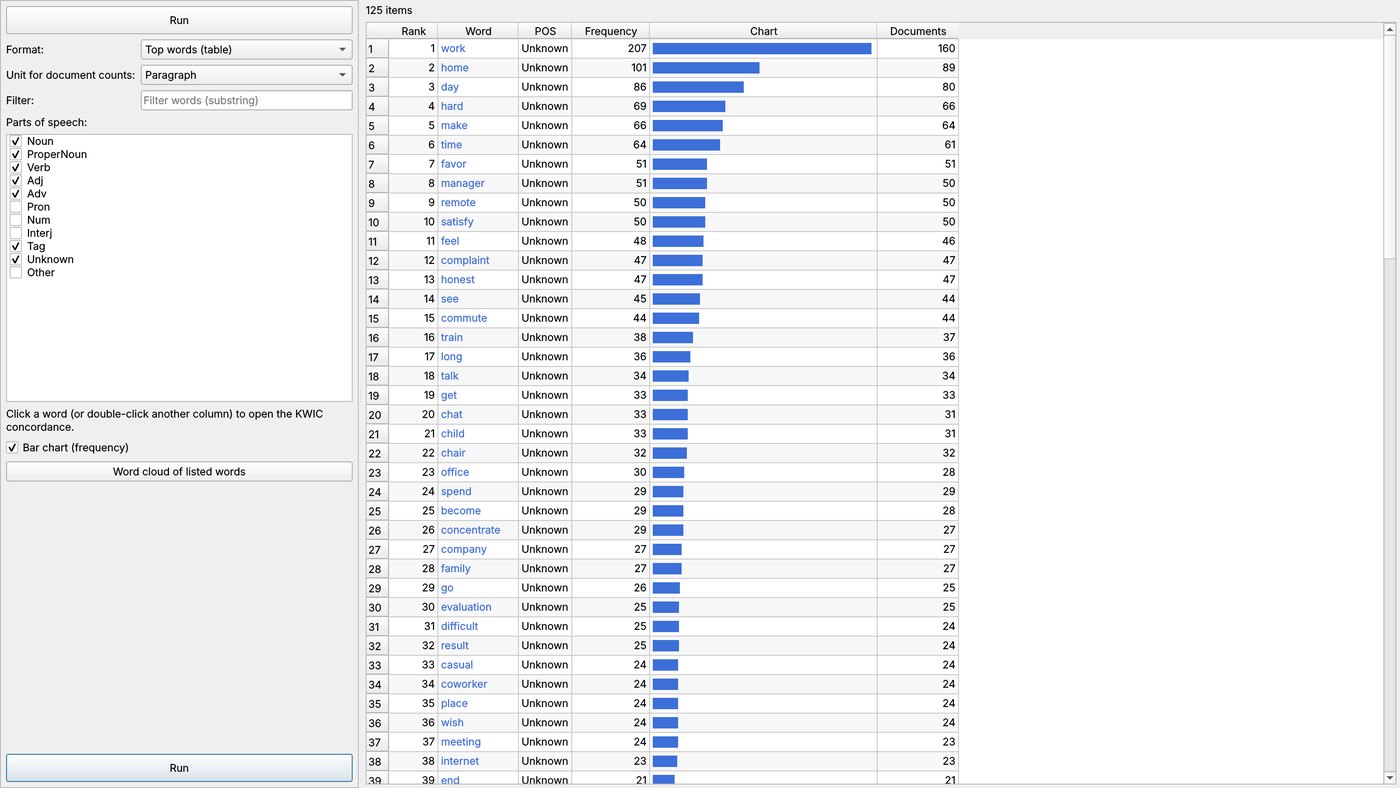
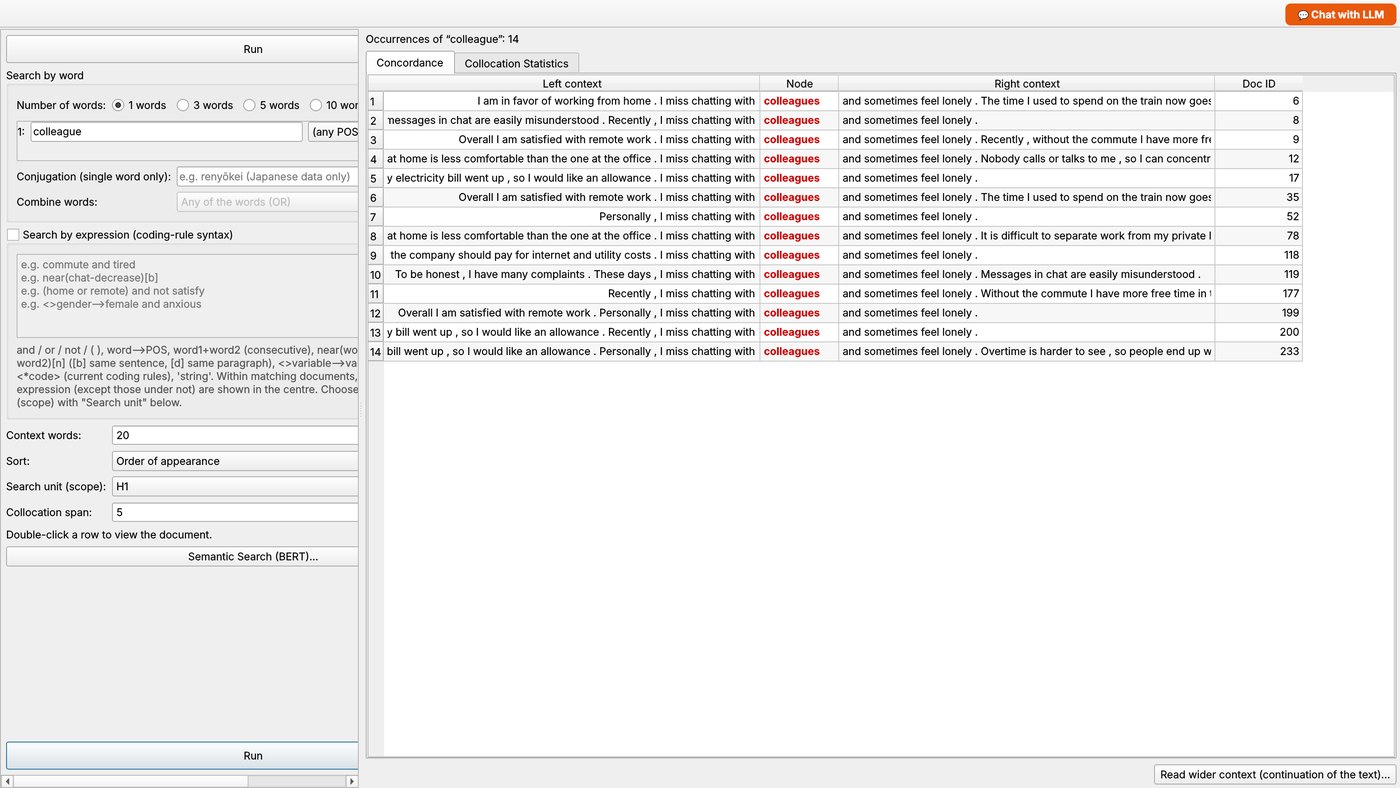
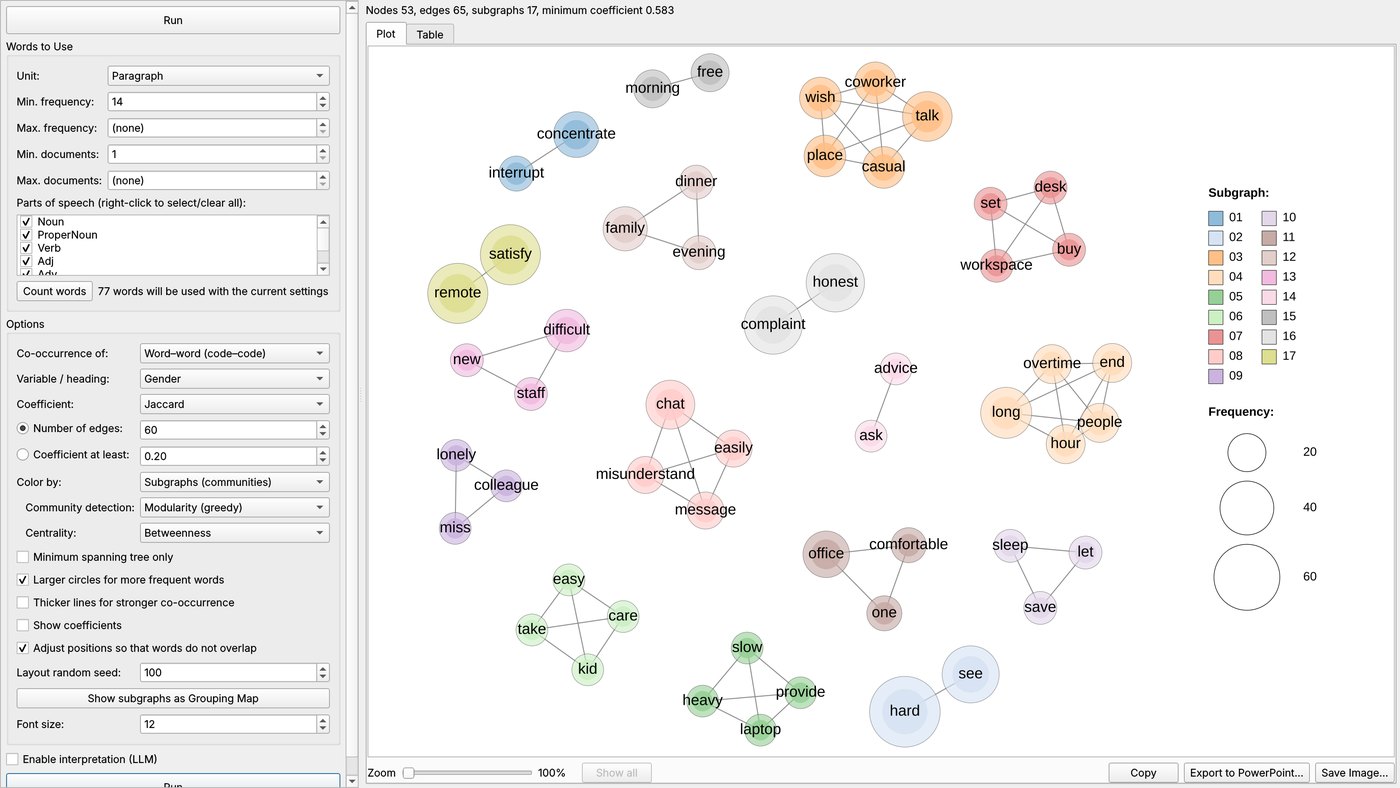
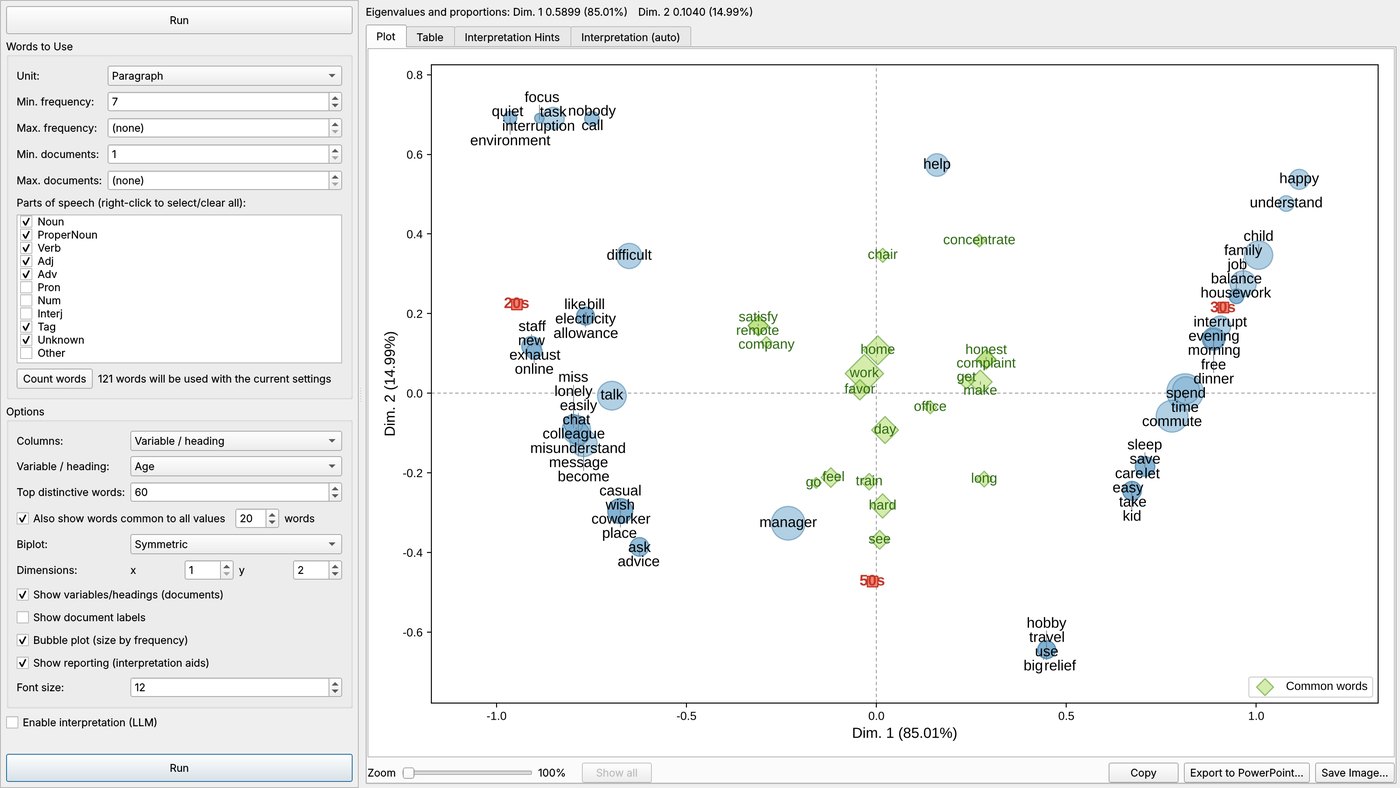
Inherited from KH Coder: word frequency lists, KWIC concordance, co-occurrence networks, correspondence analysis, clustering, self-organizing maps, topic models and more. Japanese and English texts are supported, with user, split and synonym dictionaries.
KH Coder から受け継いだ、抽出語リスト、KWIC コンコーダンス、共起ネットワーク、対応分析、クラスター分析、自己組織化マップ、トピックモデルなどの機能。日本語と英語のテキストに対応し、ユーザ辞書・分割辞書・類義語辞書も使えます。
Mining analysesマイニングの分析
Dependency parsing, word and dependency frequency, focus analysis, feature words and expressions, reputation analysis, word networks, correspondence bubble analysis, text classification and time series — designed with reference to the analyses described in Text Mining Studio's technical documents.
係り受け解析、単語頻度解析、係り受け頻度解析、注目分析、特徴分析、特徴表現分析、評判分析、言葉ネットワーク、対応バブル分析、文章分類、時系列分析。Text Mining Studio の技術資料に書かれた分析の考え方を参考に、独自に実装しました。
Meaning-based search with BERT embeddingsBERT の埋め込みによる、意味にもとづく分析
Semantic search, candidates for missed coding, classification and topics by sentence embeddings, and a check of your coding by semantic similarity. Small embedding models (about 0.1–0.4 GB) run locally, and a light option needs no download.
意味で検索、コーディングの取りこぼし候補、文の埋め込みによる分類・トピック、意味の近さによるコーディングの評価。小さな埋め込みモデル(約 0.1〜0.4GB)をこのパソコンで動かします。ダウンロード不要の簡易版もあります。
Constructivist grounded theory with AIAI支援の構成主義的グラウンデッド・セオリー
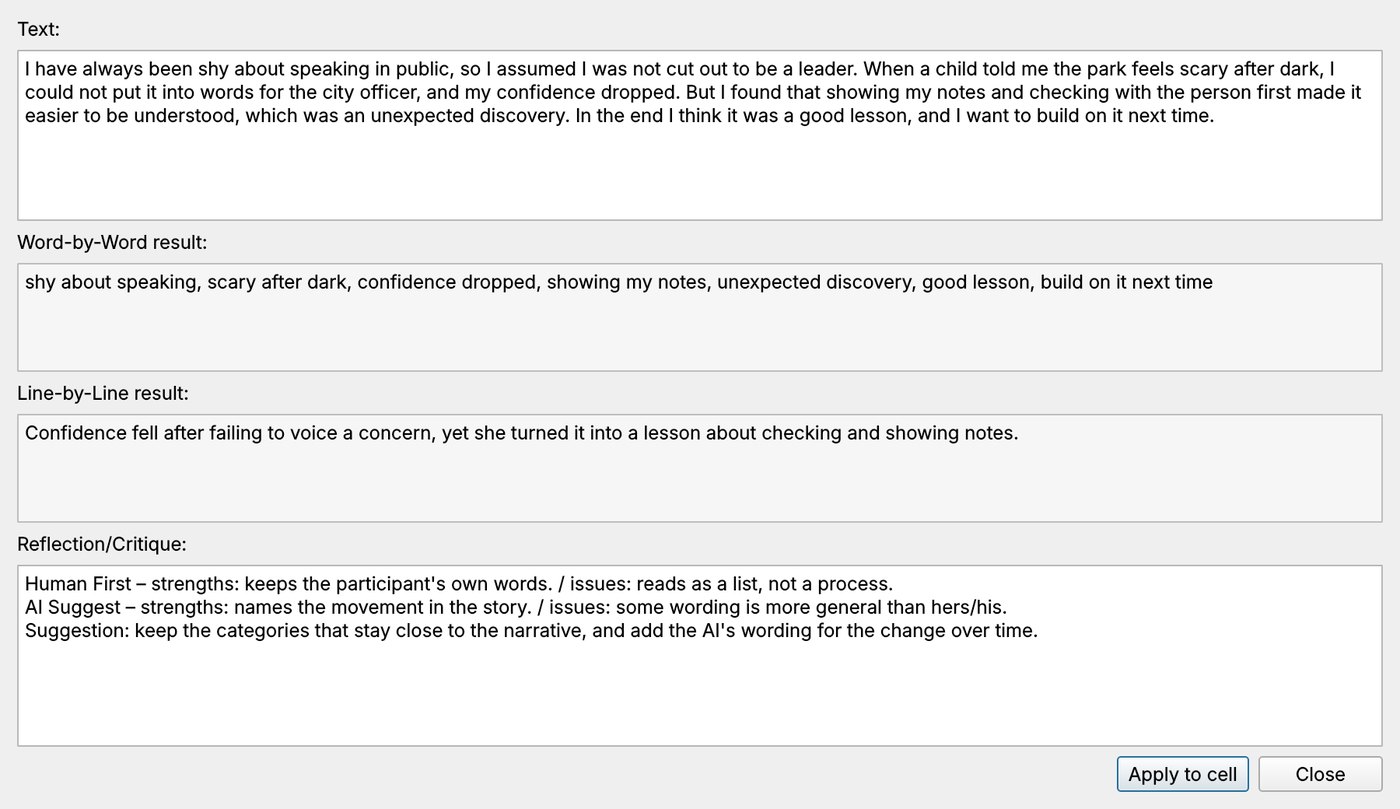
Word-by-word, line-by-line and focused coding. You write your own draft first; one click gets the AI's suggestion, and a reflection/critique compares both. You decide the final code. A review screen lines up every code of every stage.
語ごと・行ごと・焦点化コーディング。まず分析者が自分の案を書き、ワンクリックで AI の提案と、両者を比べた省察・批評が得られます。最終的なコードは分析者が決めます。確認の画面では、すべての段階のコードを並べて見られます。
Memos at every stepどの段階にもメモ
Attach memos to a whole coding sheet or to each row, and save them together.
コーディングのシート全体にも各行にもメモを付け、まとめて保存できます。
Coding rules & cross tabulationコーディングルールとクロス集計
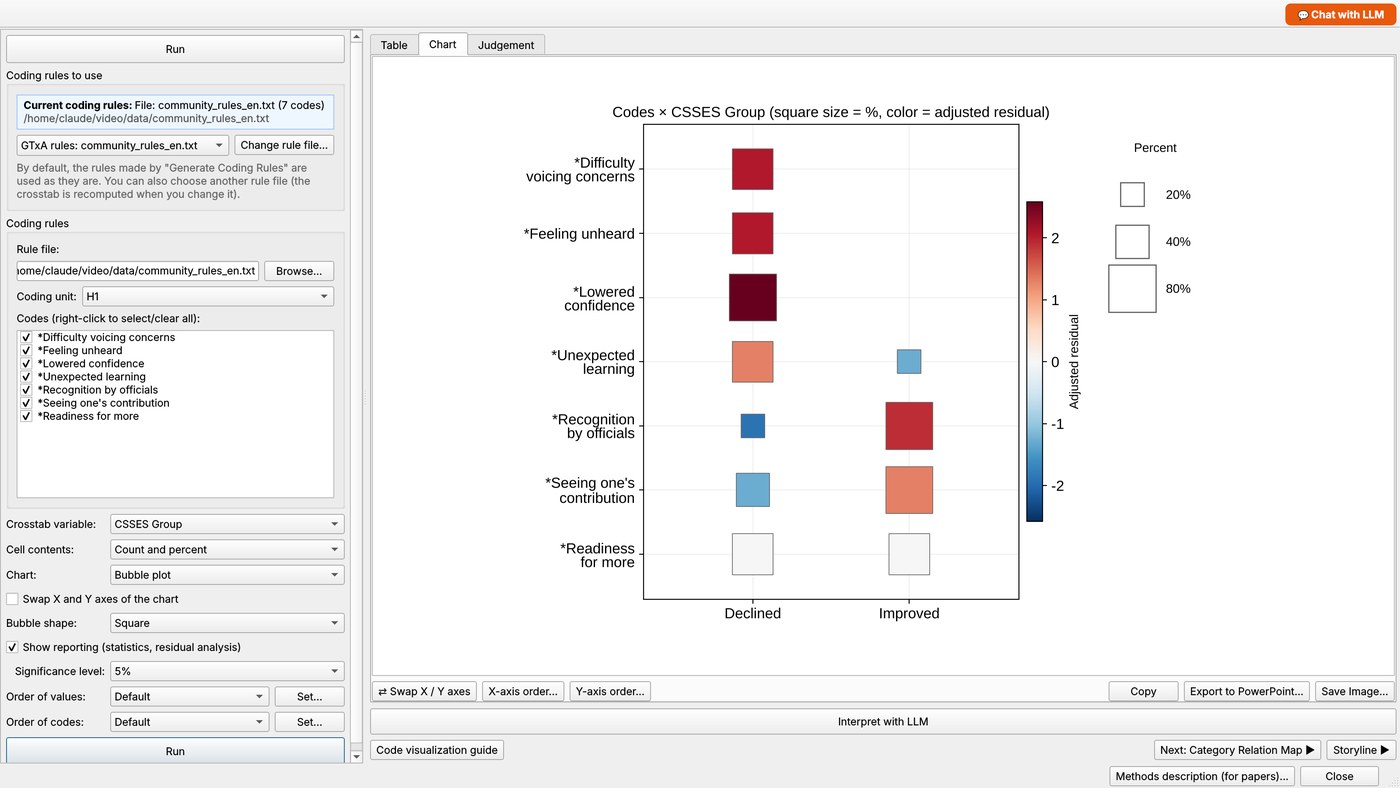
Turn final codes into coding rules and a cross tabulation. Bubble plots show which codes are significantly more frequent in each group.
最終コードからコーディングルールとクロス集計を作ります。バブルプロットで、各群に有意に多いコードがひと目で分かります。
Joint display for mixed methods混合研究法のジョイントディスプレイ
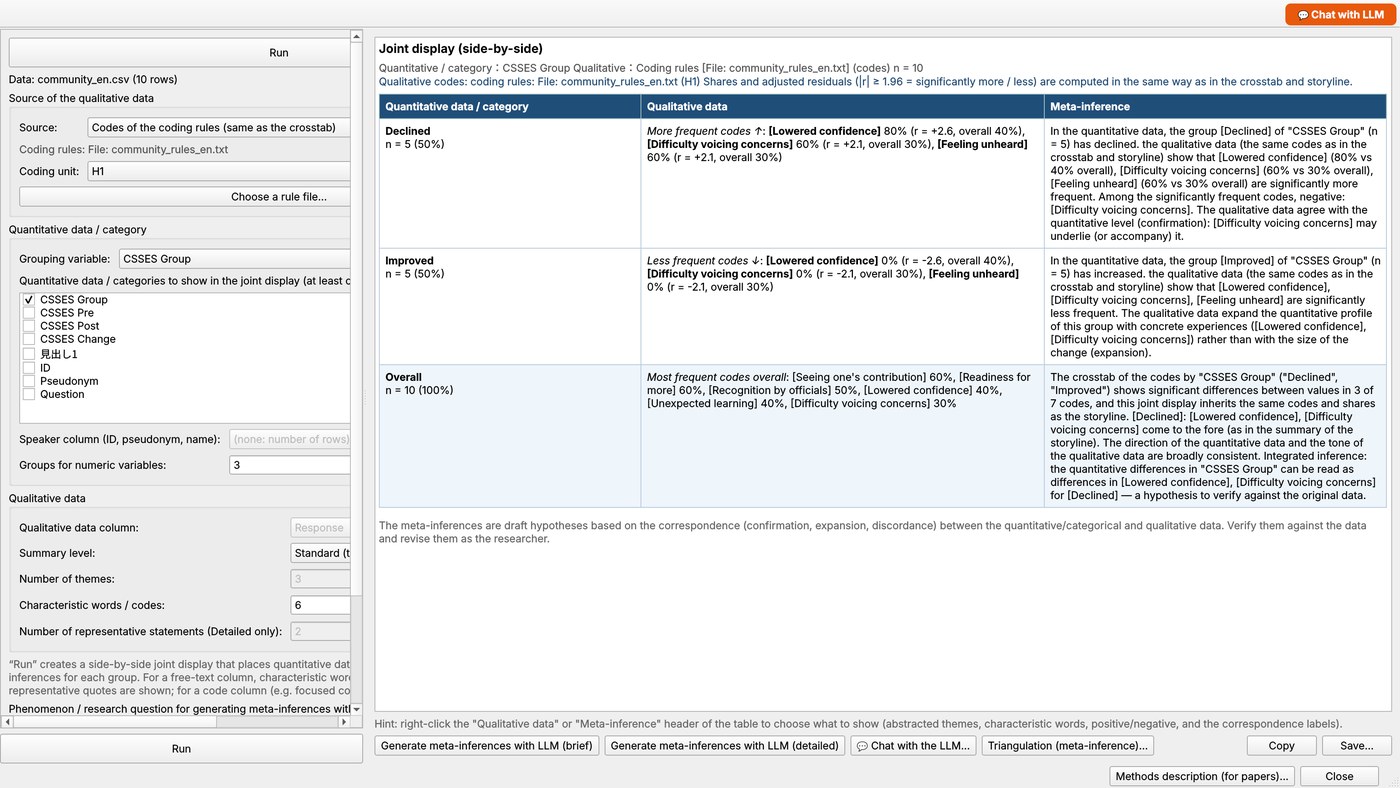
Side-by-side display of quantitative change, qualitative codes and a meta-inference for each group — built from the same codes as the cross tabulation and storyline, or from themes the AI codes from free text. The LLM can draft the meta-inference, and you can chat with it about any cell.
群ごとに、量的データ・質的データ(コード)・メタ推論を並べて示します。クロス集計やストーリーラインと同じコード、または AI が自由記述から付けたテーマにもとづきます。メタ推論の下書きを LLM に書かせたり、セルについて LLM と対話したりもできます。
Local AI or cloud AI — your choiceローカルAIもクラウドAIも選べます
AI features can use a local model (llama.cpp; 10 built-in models), an LLM server (LM Studio, Jan, Ollama), a cloud API (OpenAI, Gemini, Anthropic), a ChatGPT sign-in, or the apps you already use by manual copy. The AI is optional: all other features work without it.
AI機能には、ローカルのモデル(llama.cpp。内蔵は 10 モデル)、LLM サーバ(LM Studio・Jan・Ollama)、クラウドの API(OpenAI・Gemini・Anthropic)、ChatGPT のサインイン、いつも使っているアプリへの手動コピーを使えます。AIは任意で、使わなくても他の機能はすべて使えます。
Methods description for papers論文用の「方法」の説明
Each analysis screen can write a description of the method (settings, dictionary sizes, the LLM's name and version, etc.) as a starting point for the methods section. Always check it against what you actually did.
分析の各画面で、設定・辞書の項目数・使った LLM の名前と版などを書いた「方法」の説明を出せます。論文の方法の節のたたき台です。実際に行ったことと照らして、かならず確かめてください。
Screenshots画面の例
Click an image to enlarge. (English UI. Fictional data: a survey about working from home, and interviews from a community workshop.)
画像をクリックすると拡大します。(英語表示。架空のデータ:在宅勤務についてのアンケートと、地域ワークショップの逐語録です。)
The screenshots were taken with version 1.0.38; the screen layouts are unchanged in 1.0.43 (sample data, no AI model connected; the AI columns hold sample answers).
画面の例は、版 1.0.38 で撮影したものです(画面の構成は 1.0.43 でも変わっていません。サンプルデータ。AIモデルにはつないでいないため、AIの列にはサンプルの回答が入っています)。
Downloadダウンロード
Version 1.0.43. Free of charge, GPL v2 or later.
バージョン 1.0.43。無料・GPL v2 以降。
🍎 macOS — Apple silicon (M1 or later)
Run from Python (Windows / macOS / Linux)Python で起動する(Windows/macOS/Linux)
Requires Python 3.10 or later. Unzip the source Zip, open a terminal (Command Prompt / PowerShell on Windows, Terminal on macOS) in the unzipped GTxALab-1.0.43-source folder, then:
Python 3.10 以降が必要です。ソースの Zip を展開し、展開した GTxALab-1.0.43-source フォルダでターミナル(Windows ではコマンドプロンプトか PowerShell、macOS ではターミナル)を開いて、次のように入力します。
macOS / Linux
python3 -m venv .venv
source .venv/bin/activate
python -m pip install -r requirements.txt
python -m gtxaWindows
python -m pip install -r requirements.txt
python -m gtxaThe next time, activate the environment and run python -m gtxa again. python -m gtxa --selftest checks the main functions without opening a window. (python -m gtpy and python -m khpy start the same program.)
2回目以降は、環境を有効にして python -m gtxa を実行するだけです。python -m gtxa --selftest で、画面を開かずに主要機能の動作確認ができます。(python -m gtpy・python -m khpy でも同じプログラムが起動します。)
Optional: AI models for the AI-assisted coding任意:AI支援コーディングで使う AI モデル
AI models are not bundled. Install the local engine and download a model pair (standard ≈ 3.2 GB: Qwen3.5-2B + Ministral-3-3B; light ≈ 1.3 GB) or a single model (10 built-in models, from about 0.5 GB to 3 GB), or choose a cloud AI / an LLM server in Settings → LLM Settings. Everything except the AI features works without any of this.
AI モデルは同梱していません。ローカルのエンジンを入れてモデルをダウンロードする(標準:約 3.2GB=Qwen3.5-2B + Ministral-3-3B、軽量:約 1.3GB の組み合わせ、または内蔵の 10 個のモデルから 1 つ。約 0.5GB〜3GB)か、[設定 → LLM設定]でクラウドの AI や LLM サーバを選びます。AI機能以外は、これらがなくてもすべて使えます。
python -m pip install -r requirements-llm.txt --prefer-binary --extra-index-url https://abetlen.github.io/llama-cpp-python/whl/cpu
python -m gtxa --download-model # standard / 標準
python -m gtxa --download-model light # light / 軽量
python -m gtxa --download-model list # all models / 一覧Build the application yourselfアプリを自分で作る
Windows: run build_exe.bat. It finds Python, installs packages, builds the app and runs a self-test. Distribute the whole dist\GTxALab folder (zipped).
macOS: run ./build_mac_app.sh on a Mac. It creates dist/GTxALab.app and a Zip for your CPU type (Apple silicon / Intel). Signing and notarization are optional; see docs/macos.md in the source.
Windows: build_exe.bat を実行します。Python の検出、パッケージの導入、アプリの作成、動作確認まで自動で行います。配るときは dist\GTxALab フォルダごと Zip にします。
macOS: Mac で ./build_mac_app.sh を実行すると、dist/GTxALab.app と、お使いの CPU(Apple シリコン/Intel)用の Zip ができます。署名と公証は任意です(手順はソース内の docs/macos.md)。
1. Start GTxA Lab起動する
The shortest path from installation to a joint display. Menu names are shown as they appear in the English interface.
インストールからジョイントディスプレイまでの、いちばん短い道すじです。メニュー名は、日本語表示のものを書いています。
- Windows application: unzip the downloaded Zip (keep the whole folder together) and double-click
GTxALab.exe. - macOS application: unzip, then right-click
GTxALab.app→ Open the first time (the app is not code-signed). Choose the file that matches your Mac: Apple silicon or Intel. - From Python (any OS): install Python 3.10 or later, unzip the source, and in that folder run
python -m pip install -r requirements.txtand thenpython -m gtxa. Details are on the download page.
models folder (if you use local AI models) in the same folder as the application.- Windows のアプリ: ダウンロードした Zip を(フォルダごとまとめて)展開し、
GTxALab.exeをダブルクリックします。 - macOS のアプリ: 展開して、初回は
GTxALab.appを右クリック →[開く]で起動します(署名なしのため)。Mac の種類(Apple シリコン/Intel)に合うほうを選んでください。 - Python から(どの OS でも): Python 3.10 以降を入れ、ソースを展開したフォルダで
python -m pip install -r requirements.txt、続けてpython -m gtxaを実行します。くわしくはダウンロードのページをご覧ください。
models フォルダをアプリと同じ場所に置いてください。2. Display language表示言語
Choose to switch between Japanese and English. Menus, windows, table headings, chart text and messages all switch, and the choice is remembered. Your data (words, code names, variable values) is never translated, so you can analyze Japanese data in the English interface and vice versa.
メニュー で、日本語と英語を切り替えます。メニュー・画面・表の見出し・グラフの文字・メッセージがすべて切り替わり、次回も同じ言語で起動します。分析する対象のデータ(語・コード名・変数の値)は訳されないので、日本語のデータを英語表示で分析することも、その逆もできます。
3. Open your dataデータを読み込む
- Project → New… and choose your file. Text files (
.txt) are split into paragraphs and sentences. For tables (.csv/.tsv/.xlsx) you choose the column to analyze: each row becomes one document and the other columns are loaded as external variables (for example Gender, Age, Date). GTxA Lab detects Japanese or English from the characters and sets the language for you. - Pre-processing → Run Pre-processing. Morphological analysis (Japanese) or lemmatization (English) is carried out. This takes a little while the first time.
- (Optional) Pre-processing → Compound word detection and Select words… to force-extract compound words or exclude words you do not need.
- プロジェクト → 新規… で、分析するファイルを選びます。テキストファイル(
.txt)は、段落・文に分けられます。表形式(.csv/.tsv/.xlsx)では、分析する列を選びます。1行が1文書になり、ほかの列は外部変数(性別・年齢・日付など)として読み込まれます。 日本語か英語かは、文字の種類から自動で判別して切り替えます。 - 前処理 → 前処理の実行:形態素解析(日本語)や見出し語化(英語)をします。初回は少し時間がかかります。
- (任意)前処理 → 複合語の検出・語の取捨選択…で、複合語の強制抽出や、使わない語の指定をします。
Try it first with the English sample data in the sample folder of the source: survey_en.csv (a fictional survey about working from home, with coding_rules_en.txt) for text mining, and community_en.csv (fictional community workshop interviews, with community_rules_en.txt) for grounded theory coding, cross tabulation and the joint display — the data used in the promotional video.
はじめは、ソースの sample フォルダにある英語のサンプルで試すのがお勧めです。テキストマイニングには、在宅勤務についての架空のアンケート survey_en.csv(コーディングルールは coding_rules_en.txt)、グラウンデッド・セオリーのコーディング・クロス集計・ジョイントディスプレイには、架空の地域ワークショップの逐語録 community_en.csv(コーディングルールは community_rules_en.txt)を使います。紹介ビデオで使ったデータです。
5. Text mining basicsテキストマイニングの基本
Open the menu (データ集計).
メニューを開きます。
Word frequency list抽出語リスト
shows which words your respondents use most.
:よく使われている語がわかります。
KWIC
puts a word back into its context.
:語を前後の文脈つきで読み直せます。
Co-occurrence network共起ネットワーク
shows communities of words that appear together.
:いっしょに出てくる語のまとまり(コミュニティ)が見えます。
Correspondence analysis対応分析
maps how words relate to an external variable such as age group.
:語と、年齢などの外部変数との関係を地図にします。
7. AI settings (optional)AIの設定(任意)
The AI-assisted features (, , the LLM chat and the figure interpretations) need an AI. Open and choose one of:
- A local model (runs on your computer, nothing is sent out) — download a pair (standard ≈ 3.2 GB: Qwen3.5-2B + Ministral-3-3B; light ≈ 1.3 GB: Qwen3.5-0.8B + Granite-4.0-H-1B; Japanese-focused and other pairs) or a single model from the same screen. Ten models are built in, from Qwen3-0.6B (about 0.6 GB) and Gemma 3 1B (about 0.8 GB) to Gemma 4 E2B (about 3 GB). Models are saved in the
modelsfolder. When you run from Python, the local engine (llama-cpp-python) must be installed. - An LLM server such as LM Studio, Jan or Ollama.
- A cloud API (OpenAI, Gemini, Anthropic; an API key) or ChatGPT (). The respondents' text is sent to the service; GTxA Lab asks you to confirm before the first send.
- Your own Claude, Gemini or ChatGPT app, by manual copy (see manual topic 13).
AI を使う機能(・・LLM との対話・図の解釈)には、AI が必要です。 で、次のどれかを選びます。
- ローカルのモデル(このパソコンの中で動き、外には何も送りません):同じ画面から、組み合わせ(標準:約 3.2GB=Qwen3.5-2B + Ministral-3-3B、軽量:約 1.3GB=Qwen3.5-0.8B + Granite-4.0-H-1B、日本語向けなどの組み合わせ)か、1 つのモデルをダウンロードします。内蔵は 10 モデルで、Qwen3-0.6B(約 0.6GB)や Gemma 3 1B(約 0.8GB)から、Gemma 4 E2B(約 3GB)まであります。モデルは
modelsフォルダに保存されます。Python から起動する場合は、ローカルのエンジン(llama-cpp-python)も入れておきます。 - LM Studio・Jan・Ollama などの LLM サーバ。
- クラウドの API(OpenAI・Gemini・Anthropic。API キー)、または ChatGPT()。回答者の文章がサービスに送信されるので、最初の送信の前に確認が出ます。
- お使いの Claude・Gemini・ChatGPT のアプリに、手動コピーで(手引きの 13 を参照)。
8. Grounded theory coding — human first, AI secondグラウンデッド・セオリーのコーディング:分析者が先、AIが後
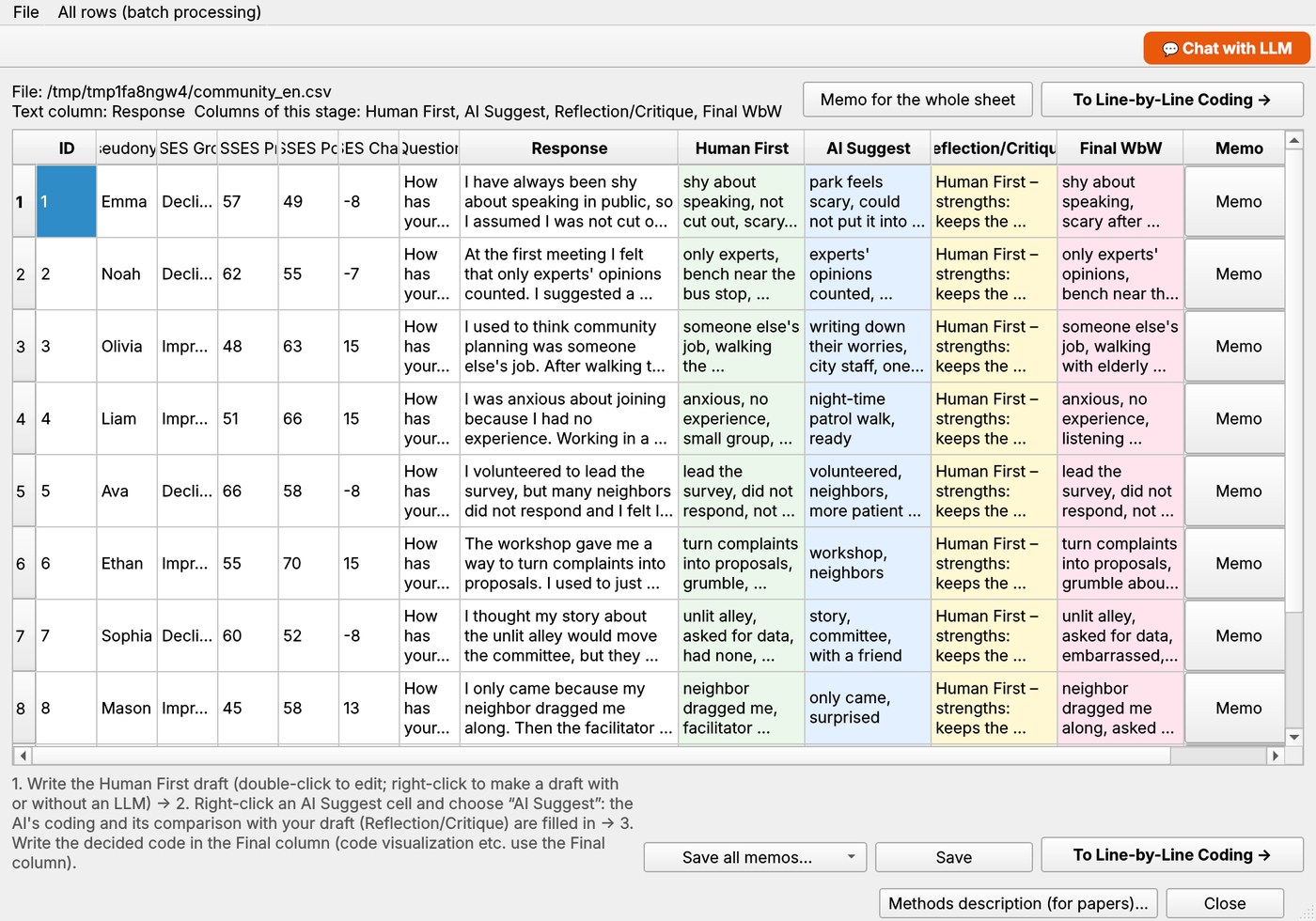
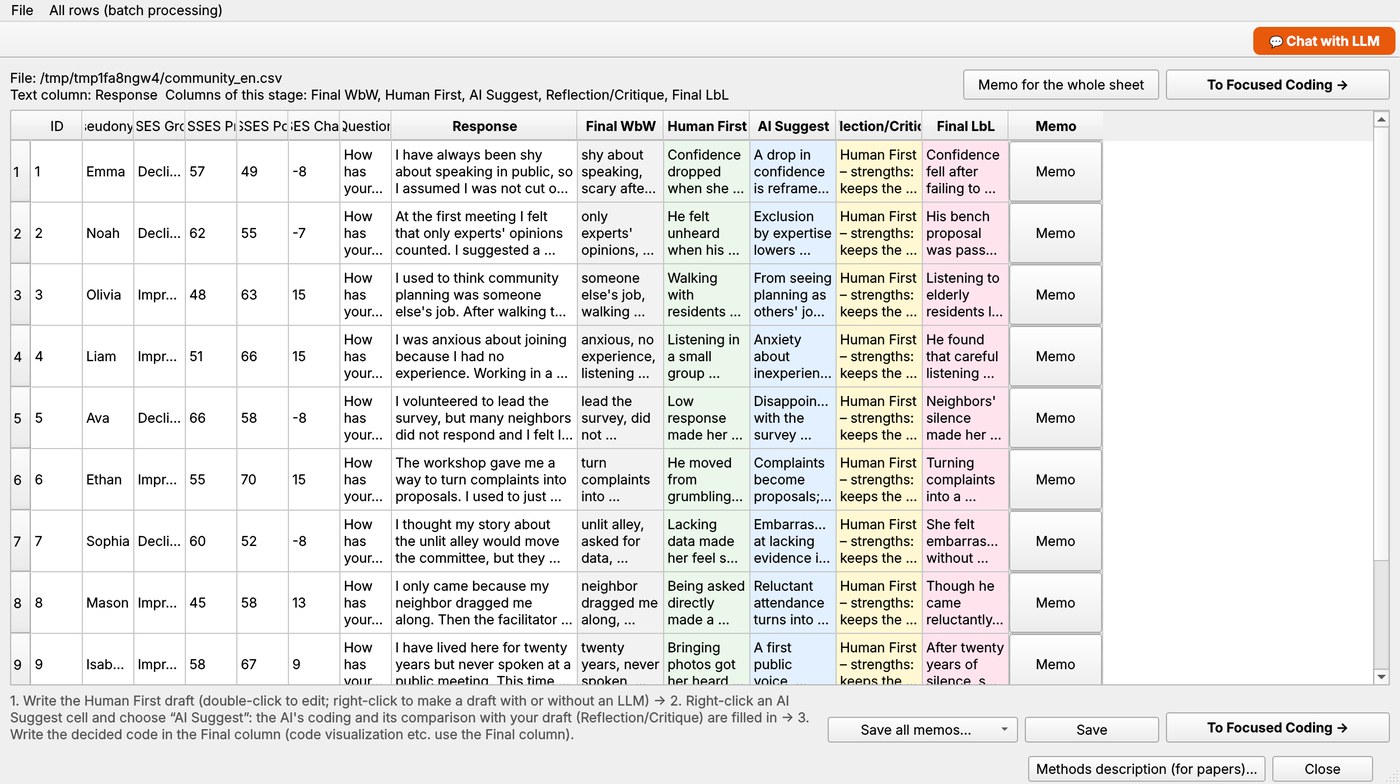
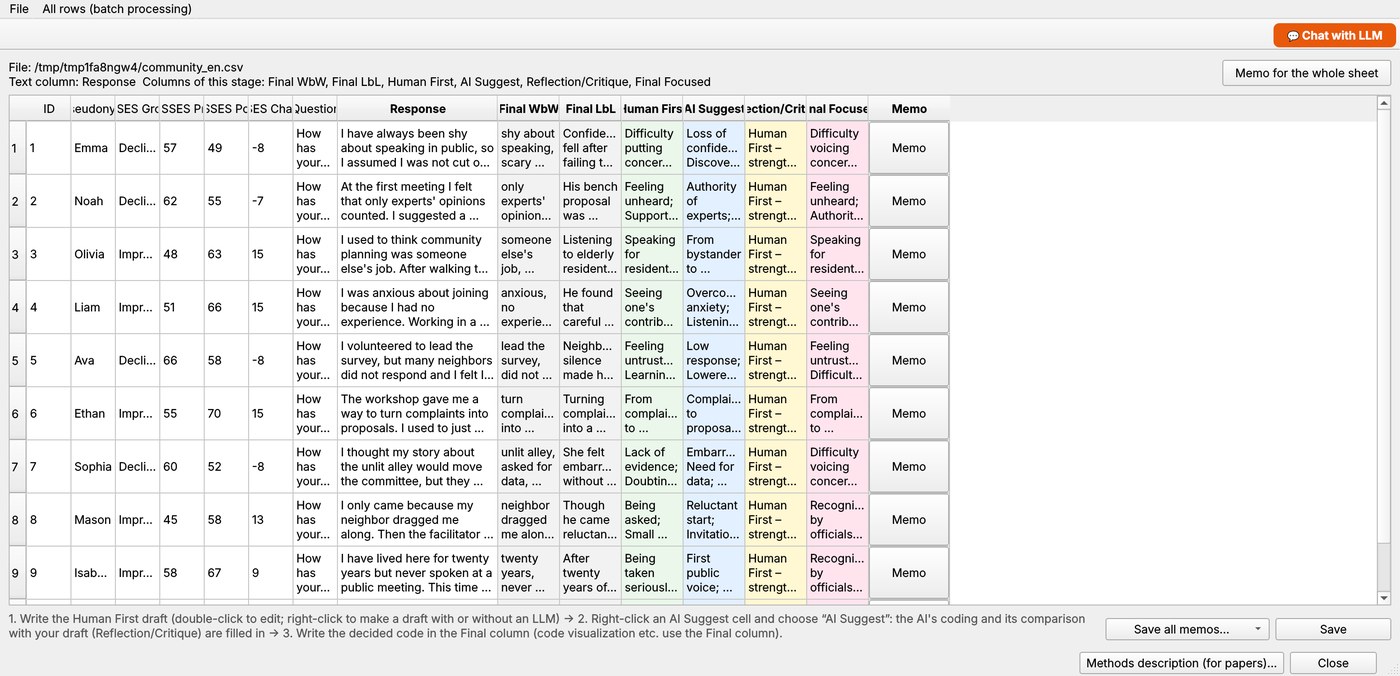
The menu has three stages. Each stage shows your table with the text column and, to its right, these columns:
メニューには3つの段階があります。どの画面も、分析対象の表のテキストの右に、次の列が並びます。
| Stage段階 | Columns to the right of the textテキストの右の列 |
|---|---|
| Word-by-Word Coding語ごとコーディング | Human First · AI Suggest · Reflection/Critique · Final WbW 分析者案・AI提案・省察/批評・最終語ごとコード |
| Line-by-Line Coding行ごとコーディング | Final WbW · Human First · AI Suggest · Reflection/Critique · Final LbL 最終語ごとコード・分析者案・AI提案・省察/批評・最終行ごとコード |
| Focused Coding/Category焦点化コーディング | Final WbW · Final LbL · Human First · AI Suggest · Reflection/Critique · Final Focused 最終語ごとコード・最終行ごとコード・分析者案・AI提案・省察/批評・最終焦点化コード |
- Write your own draft first in Human First (double-click a cell, or right-click → Edit…).
- Right-click the cell → AI Suggest. The AI codes that row and the result goes into AI Suggest; a short comparison of both drafts — strengths and weaknesses of each — goes into Reflection/Critique. If you add your draft later, use Compare again in that cell.
- You decide. Type the code you choose into the Final column, or use Copy Human First / Copy AI Suggest and edit it.
- Move on to the next stage. Each stage builds on the Final codes of the one before.
lines up the codes of all three stages in one table (coloured by stage). Edits made there appear in the three coding screens too, and vice versa.
- まず分析者案の列に、ご自分の案を書きます(セルをダブルクリック、または右クリック →[編集…])。
- セルを右クリック →[AI提案]。 AI がその行をコーディングしてAI提案に入れ、続けて、分析者案とAI提案それぞれの優れている点と課題をまとめた結果が省察/批評に入ります。分析者案をあとから書いたときは、そのセルの[比べ直す]で比較できます。
- 最終的に決めるのは分析者です。 採用するコードを最終の列に書きます。[分析者案を写す][AI提案を写す]で写してから直すこともできます。
- 次の段階へ進みます。各段階は、前の段階の最終コードを土台にします。
では、3 つの段階のコードを 1 つの表に並べます(段階ごとに色分け)。ここで直した内容は、3 つのコーディング画面にも反映され、逆も同じです。
9. Memosメモ
- Memo for the whole sheet: the button at the top right of each coding screen.
- Memo for a row: the Memo button at the right end of the row.
- Save all memos… at the bottom of the screen saves the sheet memo and all row memos together in one readable file.
- シート全体のメモ:各コーディング画面の右上のボタンで書きます。
- 各行のメモ:行の右端の[メモ]ボタンで書きます。
- メモをまとめて保存…:画面の下のボタンで、シートのメモと各行のメモを、読みやすい1つのファイルにまとめて保存します。
10. Cross tabulationクロス集計
- Open (or ) to turn your final codes into coding rules. You can also write rules yourself in the KH Coder format.
- Open , choose the external variable (for example a group such as “confidence declined / improved”), and run it.
- Read the table and the bubble plot: it shows which codes are significantly more frequent in each group. The screen arranges the codes into a story.
- (または)で、最終コードからコーディングルールを作ります。KH Coder の書式で、自分で書くこともできます。
- を開き、外部変数(たとえば「自信が下がった/上がった」の群)を選んで実行します。
- 表とバブルプロットを読みます。各群に有意に多いコードがわかります。の画面では、コードを物語の形に並べます。
11. Joint display (mixed methods)ジョイントディスプレイ(混合研究法)
- Open . (From the Storyline screen, the Joint Display button at the bottom right opens it with the same codes as your cross tabulation.)
- Choose the grouping variable (the rows; a numeric variable is split into low / middle / high groups, 2–5 groups), and optionally the quantitative variables or categories to show beside it.
- Choose the narrator column (ID or pseudonym) so that n counts the number of narrators, and the qualitative column (free text or a coding column).
- Press Run. You get three columns for each group — quantitative data | qualitative data | meta-inference — and a final row for all participants. The meta-inference says whether the two kinds of data confirm, expand or contradict one another.
- (Optional) Press Generate meta-inferences with LLM (brief) or (detailed) at the bottom: the LLM compares the groups and writes a meta-inference for each group and for all participants. You can first write the phenomenon or research question in the box on the left. Chat with the LLM… opens a dialog about the whole table or the cell you clicked.
The rule-based meta-inference is a draft hypothesis, and so is the LLM's text: check both against the original data.
- を開きます。(ストーリーラインの画面の右下の[ジョイントディスプレイ]ボタンから開くと、クロス集計と同じコードが引き継がれます。)
- 群に分ける変数(行になる変数。数値の変数は「低・中・高」などに分けます。群の数は2〜5)と、並べて示したい量的データ/カテゴリ(任意)を選びます。
- 語り手の列(ID・仮名など)を選ぶと、n は語り手の数で数えます。質的データの列(自由記述、またはコードの列)も選びます。
- [実行]を押すと、群ごとに 量的データ|質的データ|メタ推論 の3列が並び、最後に「全体」の行が付きます。メタ推論は、2種類のデータが互いに確証するか・拡張するか・矛盾するかを示します。
- (任意)画面の下の[メタ推論をLLMで生成(簡略)]または[(詳細)]を押すと、LLM が群どうしを比べて、群ごと・全体のメタ推論を書きます。左の欄に、調べている現象や研究の問いを先に書いておくこともできます。[LLM と対話…]では、表全体、またはクリックしたセルについて、LLM と対話できます。
規則にもとづくメタ推論は、仮説の下書きです。LLM の文章も同じです。どちらも、元のデータで確かめてください。
14. Saving保存
- A project is a single
.gtxafile (SQLite). It also contains the original text, so you may move or delete the source file. - Tables and charts have their own Save… buttons. If a file with the same name already exists, GTxA Lab asks what to do; your original files are never changed.
- Coding sheets, memos, interpretations and joint displays can be saved from their own screens. The AI theme book, the AI's classification and the record of manual-copy exchanges are kept in the project, so you can stop and continue later.
- プロジェクトは
.gtxaファイル(SQLite)1つに保存されます。原文も入っているので、元のファイルを移動・削除してもかまいません。 - 表やグラフには、それぞれの[保存…]ボタンがあります。同じ名前のファイルがあるときは、どうするかを尋ねます。元のファイルは変わりません。
- コーディングのシート、メモ、解釈、ジョイントディスプレイも、それぞれの画面から保存できます。AIテーマブック、AI の分類、手動コピーのやり取りの記録は、プロジェクトに残るので、途中でやめて、続きから再開できます。
15. Troubleshooting困ったとき
“Failed to load Python DLL” on WindowsWindows で「Failed to load Python DLL」と出る
You started an unfinished copy of the program. Start GTxALab.exe from the finished GTxALab folder (the one that contains _internal next to the exe), not from a build folder.
作成途中のコピーを起動しています。完成した GTxALab フォルダ(exe の隣に _internal があるフォルダ)の GTxALab.exe を起動してください(build フォルダのものではありません)。
The AI menu items do not workAI のメニューが使えない
Open and download a model, or choose an LLM server or a cloud AI. When running from Python, the local engine must be installed (see the download page). All other features work without an AI.
でモデルをダウンロードするか、LLM サーバやクラウドの AI を選んでください。Python から起動している場合は、ローカルのエンジンも必要です(ダウンロードのページ参照)。AI以外の機能は、AI がなくても使えます。
The AI's suggestion has nothing to do with my textAI の提案が、本文と関係ない
Small models (about 1 GB or less) sometimes do this. Try a larger model (for example the standard pair, or Gemma 4 E2B), or write the code yourself and use the AI only for comparison. For small local models, Japanese focused coding already re-asks and falls back to a rule-based phrase when the answer shares no characters with the text; this is a rough safeguard and cannot catch every case.
小さなモデル(約 1GB 以下)では、ときどき起こります。もっと大きなモデル(たとえば標準の組み合わせや Gemma 4 E2B)を試すか、ご自分でコードを書き、AI は比べるためにだけ使ってください。小さなローカルモデルの日本語の焦点化コーディングでは、答えが本文と 1 字も重ならないときに、聞き直しと、規則で作る語句への切り替えを行いますが、粗い目安なので、すべてを防げるわけではありません。
macOS says the app cannot be openedmacOS で「開けません」と出る
The app is not signed. Right-click GTxALab.app and choose Open, then confirm. If it still does not start, run from the source code instead.
アプリに署名がないためです。GTxALab.app を右クリックして[開く]を選び、確認します。それでも起動しないときは、ソースコードから起動してください。
Check that everything is installed correctly正しく入ったか確かめる
python -m gtxa --selftest
python -m gtxa --path-checkThe self-test runs the main functions without opening a window. (For the Windows application: GTxALab.exe --selftest.)
セルフテストは、画面を開かずに主要機能を動かして確認します。(Windows のアプリでは GTxALab.exe --selftest。)
4. Dictionaries辞書
Open . There are three kinds, in tabs: User dictionary (make a string one word), Split dictionary (Japanese only: split words that were joined too much, written left|right, where * matches any characters) and Synonym dictionary (replace synonyms with a representative word; setting its part of speech to “symbol” removes the word from the analysis). You can keep several dictionaries of each kind, switch them on and off, and set their priority.
を開きます。タブは 3 種類です。ユーザ辞書(文字列を 1 語にする)、分割辞書(日本語のみ。つながりすぎた語を分ける。左側|右側 と書き、* は任意の文字)、類義語辞書(類義語を代表語に置き換える。品詞を「記号」にすると、その語は分析に使いません)。どの種類も、複数の辞書を持ち、使う・使わないの切り替えと、優先順位を決められます。
- Order of processing: morphological analysis → user dictionary → split dictionary → synonym dictionary.
- After editing the user or split dictionary, run Run Pre-processing again (a mark
--*--shows dictionaries edited after the last run). The synonym dictionary can be applied with Replacement alone (mark--+--). - You can also register words from a result table: select words in a table with an “extracted word” column (such as the frequency list), right-click, and choose Register as one word in the user dictionary, Register in the split dictionary or Register as one group in the synonym dictionary.
- CSV import and export follow the Text Mining Studio dictionary files. By similar spelling… in the synonym tab proposes groups of words that differ only in width, case, hiragana/katakana, long vowels, and so on.
- For English, the user dictionary (multi-word entries such as
New Yorkbecome one term) and the synonym dictionary are available; the split dictionary is not.
- 処理の順序:形態素解析 → ユーザ辞書 → 分割辞書 → 類義語辞書。
- ユーザ辞書・分割辞書を編集したあとは、もう一度[前処理の実行]が必要です(前回の実行のあとに編集した辞書には「
--*--」の印が付きます)。類義語辞書は、[置換処理]だけで反映できます(「--+--」の印)。 - 結果の表から語を登録することもできます。「抽出語」の列がある表(抽出語リストなど)で語を選び、右クリックして、[ユーザ辞書にひとつにまとめて登録する][分割辞書に登録する][類義語辞書にひとつにまとめて登録する]のどれかを選びます。
- CSV の読み込み・書き出しは、Text Mining Studio の辞書ファイルの形式に合わせています。類義語辞書の[字面の類似から候補…]は、全角・半角、大文字・小文字、ひらがな・カタカナ、長音などの違いだけの語を、グループとして提案します。
- 英語では、ユーザ辞書(
New Yorkのように空白で区切った複数の語を、1 つの語にまとめる)と類義語辞書が使えます。分割辞書は使えません。
6. Mining analysesマイニングの分析
Open . These analyses use dependency (syntactic) relations — “which word modifies which” — in addition to word counts. They were implemented with reference to the analyses described in Text Mining Studio's technical documents; they are not that product.
を開きます。これらの分析は、語の数に加えて、係り受け(どの語がどの語にかかるか)を使います。Text Mining Studio の技術資料に書かれた分析の考え方を参考に、独自に実装したもので、その製品ではありません。
Word Frequency / Dependency Frequency単語頻度解析・係り受け頻度解析
Top N words (or “modifier – modified” expressions), narrowed by part of speech, with tables and bar charts. Tabulate by attribute, and draw a bubble cross-tabulation by attribute value or by date (period: day, week, month, quarter, year). Click an expression to see the sentences that contain it.
上位 N 件の語(または「係り元-係り先」の表現)を、品詞などで絞って、表と棒グラフで示します。属性別の集計と、属性の値別・日付別(日・週・月・四半期・年)のバブルのクロス集計ができます。表現をクリックすると、それを含む文の一覧が開きます。
Focus Analysis · Feature Words · Feature Expressions注目分析・特徴分析・特徴表現分析
Words that co-occur with a word of interest; words and expressions characteristic of each attribute value (combinations such as “20s–women” are possible).
注目する語と共起する語。属性の値(「20代-女性」のような組み合わせも可)ごとに特徴的な語・表現。
Reputation Analysis評判分析
Scores favourable and unfavourable evaluations of each word from its dependency on evaluative words; negation, impossibility and excess reverse or adjust the score.
評価語との係り受けから、語ごとの好評・不評を数えます。否定・不可能・過度などは、点数を反転・調整します。
Word Network · Correspondence Bubble Analysis言葉ネットワーク・対応バブル分析
Networks of words and attributes by co-occurrence or dependency; correspondence analysis of modifier × modified, attribute × word, or attribute × expression, drawn as bubbles.
共起または係り受けにもとづく、語と属性のネットワーク。係り元×係り先、属性×語、属性×表現の対応分析(バブル図)。
Text Classification文章分類
Classifies lines or passages by k-means (cosine, Euclid, Manhattan) or binomial soft clustering (PLSA), with representative words for each class.
行または文章を、k-means 法(Cosine・Euclid・Manhattan)または二項ソフトクラスタリング(PLSA)で分類し、分類ごとの代表語を示します。
Time Series時系列分析
Frequency over time of words or expressions (top, most variable, rising). In the stacked-area view a layer is highlighted when you hover over it, and clicking it opens its KWIC concordance.
語や表現の頻度の推移(上位・変動が大きい・上昇傾向)。積み上げ面では、層にマウスを乗せると強調され、クリックすると KWIC コンコーダンスが開きます。
12. AI-coded joint displayAIでコード化するジョイントディスプレイ
Use this when you do not have codes yet and want the AI to propose themes from free text and to code every row, which you then review. Open . The screen goes through four steps.
まだコードがなく、自由記述から AI にテーマを提案させ、全行をコード化させて、その結果を分析者が点検する、という使い方です。 を開きます。画面は 4 つの段階で進みます。
- Settings. Choose the qualitative column, the number of themes, your research question and the mixed methods design. In “how to use the AI” you can choose the method (a local model, an API, or manual copy) and how many requests run at the same time (1–4; cloud AI only).
- Themes (also reachable from ). Write your own themes (name and definition) first; the AI adds only what is missing. Edit names and definitions, switch themes on or off, and save or load the theme book (JSON).
- Classification. The AI answers, row by row, up to three matching themes with a supporting quotation. The program checks that each quotation really occurs in the original text and marks failures with ✗. Edit the “final themes” column (yellow) and the joint display uses your version. Results are saved in the project, so you can stop and continue.
- Joint display. Theme proportions and adjusted residuals for each group; the meta-inference is written by the LLM for each group and for all participants, from the table the program computed. A methods description (model, settings, theme book, quotation check rate) can be exported.
- 設定。質的データの列、テーマの数、研究の問い、混合研究法のデザインを選びます。「AI の使い方」では、方式(ローカルのモデル・API・手動コピー)と、同時に処理する数(1〜4。クラウドの AI のみ)を選べます。
- テーマ(からも開けます)。先にご自分のテーマ(名前と定義)を書くと、AI は足りないものだけを足します。名前・定義の修正、使う/使わないの切り替え、テーマブックの保存・読み込み(JSON)ができます。
- 分類。AI が、1 行ずつ、あてはまるテーマ(最大 3 つ)と根拠の引用を答えます。引用が原文に本当にあるかを、プログラムが照合し、見つからない行には ✗ を付けます。「最終テーマ」の欄(黄色)を直すと、ジョイントディスプレイには、直した内容を使います。結果はプロジェクトに保存されるので、途中でやめて、続きから再開できます。
- ジョイントディスプレイ。群ごとのテーマの割合と調整済み残差を示し、メタ推論は、プログラムが計算した表をもとに、LLM が群ごと・全体について書きます。方法の説明(モデル・設定・テーマブック・引用の確認率)も出せます。
Triangulation: a second AI三角検証:2 つ目の AI
In the classification step, Triangulation: code with a second AI and compare… has another AI (for example an app you use by manual copy) classify the same rows with the same theme book. GTxA Lab shows exact-match rows, the mean Jaccard coefficient, Cohen's κ for each theme and the share of quotations verified, and lists the rows where the two disagree so that you can choose AI 1, AI 2, both or the common part and apply it to the final themes. Triangulation (meta-inference)… does the same for the meta-inferences.
分類の段階の[三角検証:2 つ目の AI でも分類して比べる…]では、別の AI(たとえば手動コピーで使うアプリ)にも、同じテーマブックで同じ行を分類させます。完全一致の行、Jaccard 係数の平均、テーマごとの Cohen の κ、引用が確かめられた割合を示し、不一致の行は、AI 1・AI 2・両方・共通だけ、のどれを採るかを選んで、最終テーマに反映できます。[三角検証(メタ推論)…]では、メタ推論について同じことを行います。
13. Claude, Gemini and ChatGPT apps (manual copy)Claude・Gemini・ChatGPT のアプリで使う(手動コピー)
GTxA Lab does not talk to the service. It writes the prompt; you paste it into the app, then paste the app's answer back. You need no API key, and you use the app and plan you already have.
GTxA Lab は、サービスとは通信しません。プロンプトを作り、あなたがそれをアプリに貼り付けて、アプリの答えを貼り戻します。API キーは要らず、すでにお使いのアプリとプランを使えます。
- In → Settings → “how to use the AI” → Method, choose manual copy, and enter the name and version of the AI you use (it is written into the methods description). For the rule-based joint display, tick “manual copy” on the left.
- Themes: the prompt covers up to 80 rows, evenly chosen. Classification: the rows are cut into prompts of several rows each (20 by default). Meta-inference: one prompt for all groups. Press 📋 Copy the prompt, paste it into the app, send it, copy the answer and paste it back.
- 🌐 Show a browser alongside puts the Claude, Gemini or ChatGPT page beside the dialog (you sign in inside it). Sending is always done by you; GTxA Lab never reads or rewrites the page — it only uses the text you select and the clipboard.
- Answers that cannot be read are explained, and you can paste again. Rows the app skipped, or answers whose numbering shifted, are detected by checking the first characters of each answer, and passed to the next prompt. This check cannot detect a shift when neighbouring answers begin with the same words.
- Chat with the LLM… works the same way: write a question, copy the prompt, paste it into the app, paste the answer into the “AI's answer” box and add it to the conversation.
- Save the record of exchanges… writes the prompts, answers, the AI's name, dates and the number of re-pastes as an appendix (Markdown or JSON).
- → 設定 →「AI の使い方」→[方式]で手動コピーを選び、使う AI の名前と版を書きます(方法の説明に使われます)。ルール版のジョイントディスプレイでは、左の「手動コピー」にチェックを入れます。
- テーマの作成:等間隔に選んだ最大 80 行を 1 つのプロンプトにします。分類:行を数件ずつ(既定は 20 件)のプロンプトに分けます。メタ推論:全群を 1 つのプロンプトにします。[📋 プロンプトをコピー]→ アプリに貼り付けて送信 → 答えをコピー → この画面に貼り戻す、の順です。
- [🌐 ブラウザを並べて表示]で、Claude・Gemini・ChatGPT のページを、ダイアログの横に出せます(サインインは、この中で行います)。送信は、かならずご自分で押します。GTxA Lab は、ページの中身を読んだり書き換えたりせず、選んだ文字とクリップボードだけを使います。
- 読み取れない答えは、理由を表示して、貼り直せます。アプリが飛ばした行や、番号がずれた答えは、各答えの最初の数文字を照合して見つけ、次のプロンプトに回します。となりの答えが同じ書き出しだと、ずれは見分けられません。
- [LLM と対話…]も同じ流れです。質問を書き、プロンプトをコピーしてアプリに貼り付け、答えを「AI の答え」の欄に貼って、会話に追加します。
- [やり取りの記録を保存…]で、プロンプト・答え・AI の名前・日時・貼り直した回数を、付録(Markdown または JSON)として書き出せます。
License and creditsライセンスと謝辞
Open sourceオープンソース
GTxA Lab is open-source software developed by Mitsuyuki Inaba, based on the source code of KH Coder, which is released under GPL 2.0. GTxA Lab is distributed under the GNU General Public License, version 2 or later; the license text is included in the source Zip (LICENSE).
GTxA Lab は、GPL 2.0 で公開されている KH Coder のソースコードをもとに、Mitsuyuki Inaba によって開発された、オープンソースソフトウェアです。GNU 一般公衆利用許諾契約書(GPL)バージョン2以降のもとで配布します。ライセンス文はソースの Zip(LICENSE)に含まれています。
Developed with generative AI生成AIを使った開発
GTxA Lab has been developed by extending KH Coder, whose source code is available under the GPL version 2, using generative AI.
GTxA Lab は、GPL バージョン2で公開されている KH Coder のソースコードを、生成AIを使って拡張して開発されました。